
The Hidden Costs of Cloud: What Your Provider Won't Tell You
You've read the cloud economics basics. This is the layer underneath — the costs that only surface once you're committed.
You Already Know the Obvious Ones
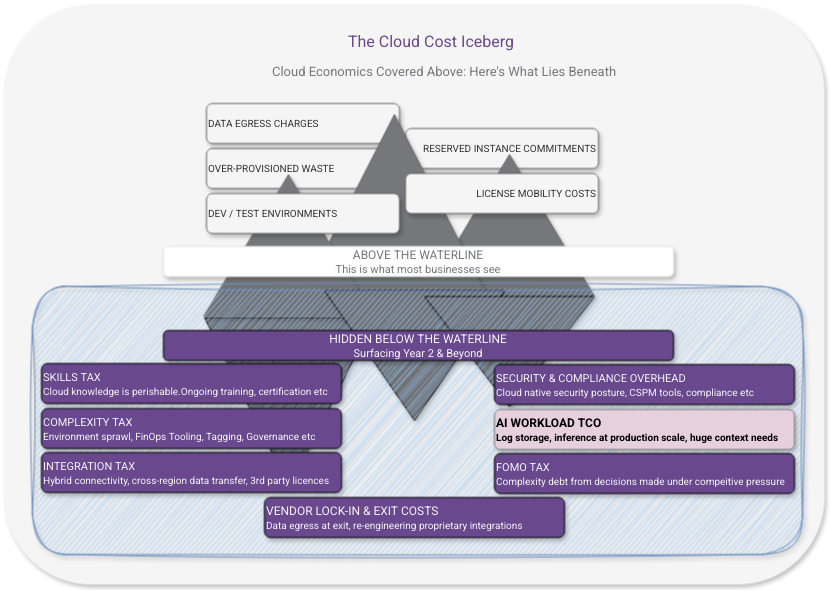
If you’ve read my cloud economics post on this blog, you know all about data egress charges. You know about the CapEx-in-OpEx-clothing of reserved instances. You know about dev/test environments silently burning money over the weekend, and the way over-provisioning bakes waste into your baseline from day one.
That’s basic stuff that surfaces quickly, is well known and gets written about everywhere.
What about beneath the surface? There are many costs that don’t show up until you’re well past the honeymoon phase. The ones where there is no commercial incentive to highlight, or where it wasn’t caught in the migration assessment so it’s not budgeted for because it’s not a line item on a pricing sheet.
These are the costs that cause genuine financial shock in years two and three of a cloud programme. Let’s get ahead of them.
The Skills Tax
Cloud is not cheaper to operate than on-premises. It’s expensive in different ways. One of the most consistent ways cloud costs are underestimated by organisations is through treating skills as a one-time migration investment rather than an ongoing operational overhead.
Cloud platforms evolve fast. Services get renamed, deprecated, replaced. Security models change. New capabilities arrive that change what best practice looks like. The skills your team has today need continuous refreshment. That skill retention has a cost in training time, certification renewal, and the productivity dip every time someone gets up to speed on a significant platform change.
Then there’s the skills gap that opens when cloud-fluent staff leave. On-premises environments are relatively stable; someone who knew your infrastructure three years ago mostly still knows it. Cloud environments drift. The institutional knowledge of how your cloud environment is actually configured is more perishable than it was on-premises, and rebuilding it after turnover is expensive.
What to budget for: Ongoing training and certification costs as a standing line item, not a one-time migration expense. Factor the real cost of knowledge loss into your retention and succession planning.
The Complexity Tax
Cloud platforms make it easy to deploy things. They make it considerably harder to understand what you’ve deployed, how it all fits together, and what the true cost of the whole picture is.
Over time, cloud environments accumulate. Accounts multiply. Services proliferate. Tags get applied inconsistently, or not at all. That experimental workload someone spun up in Q3 is still running in Q1 of the following year because nobody is quite sure if anything depends on it. The cloud equivalent of the forgotten server under someone’s desk, except it’s billing you monthly.
Managing this complexity requires investment in tooling (cloud management platforms, cost visibility tools, configuration management), processes (tagging governance, account hygiene, regular reviews), and people with the time and mandate to actually do the work. FinOps has emerged as an entire discipline precisely because cloud complexity without financial governance is an expensive way to operate.
None of this appears in a migration business case. All of it is real.
What to budget for: Cloud management tooling, dedicated FinOps time (whether a person or a portion of someone’s role), and the operational overhead of regular environment reviews. If your cloud estate is growing and nobody owns its ongoing hygiene, the bill is growing too.
The Integration Tax
Your on-premises environment had integration points — connections between systems, APIs, data flows. When you move workloads to cloud, some of those integrations become cross-environment connections. And cross-environment connectivity has costs that don’t exist when everything is in the same building.
VPN and ExpressRoute/Direct Connect costs for hybrid connectivity between on-premises and cloud are significant and ongoing for as long as you’re in a hybrid state. Which, for most organisations, is longer than originally planned.
Data transfer costs between cloud services are less intuitive. Moving data between services within the same region is usually cheap or free. Moving it between regions, between availability zones, or between your cloud environment and external systems adds up in ways that catch people out, especially when those data flows weren’t carefully mapped before migration.
Third-party integration costs change shape in cloud. A vendor that had an on-premises integration may charge differently for their cloud connector, or require a different licence tier, or have an API call limit that your architecture quietly exceeds at scale.
What to budget for: Map every integration point before migration. Model the data flows and their associated costs in cloud. Include hybrid connectivity as a standing operational cost for as long as you’re running in a hybrid state.
The Security and Compliance Cost Nobody Budgets
Security in the cloud is a shared responsibility model — the provider secures the infrastructure, you secure everything you deploy on top of it. What this means in practice is that a significant portion of your on-premises security posture needs to be rebuilt in cloud, in cloud-native ways, and maintained as your environment evolves.
That’s not a one-time migration cost. It’s an ongoing operational investment.
Cloud security tooling — CSPM (Cloud Security Posture Management), SIEM integration, identity governance, secrets management — adds up. The native tooling from your cloud provider covers some of this; for a complete picture you’ll typically need additional investment, either in third-party tooling or in the engineering time to build and maintain cloud-native controls.
Compliance overhead is frequently underestimated. If your organisation operates under regulatory frameworks — FCA, NHS DSPT, GDPR, ISO 27001, PCI DSS — moving to cloud doesn’t reduce that compliance burden. It changes its shape. Your auditors will have questions about shared responsibility, data residency, access controls, and audit trails that your on-premises answers don’t satisfy. Addressing those questions takes time and money.
Incident response changes in cloud. Forensics, log analysis, and recovery procedures that were established for on-premises environments may not translate. Building cloud-native incident response capability is an investment that rarely appears in migration budgets and only becomes urgent when you need it.
What to budget for: Cloud security tooling as a standing operational cost. Compliance review and remediation time when frameworks are assessed against your cloud environment. Investment in cloud-native incident response capability before you need it, not after.
The AI Workload Trap
This one is increasingly relevant and almost never accounted for properly.
If AI capability is part of your cloud strategy — and for many organisations it’s becoming one of the primary drivers — the total cost of AI workloads is substantially higher than the headline infrastructure costs suggest. The business case typically includes model hosting and inference costs. It typically excludes quite a lot.
Inference costs compound with scale. What looks affordable in a pilot, with controlled usage and a small user base, scales non-linearly in production. And inference costs are not static; they’re sensitive to how well your context and prompting is engineered, to retry rates when outputs aren’t good enough, and to the architectural choices you’ve made about where AI sits in your workflows.
Context engineering is a hidden cost. Production AI systems require significant engineering work to deliver consistent outputs. System prompts, retrieval infrastructure, session management, user context injection — this is real engineering investment, not configuration. It’s also an ongoing cost, not a one-time build, because it needs maintenance as your use cases evolve and as model behaviour changes between versions.
Log storage at scale is a surprise. Conventional application logs are compact and aggregatable. AI system logs — full context windows at every inference call, potentially tens of thousands of tokens per transaction — are not. If you’re operating in a regulated industry, you can’t discard these logs at will because you don’t know at log time which transactions will need to be audited. At required retention horizons (seven years minimum in financial services), this becomes a substantial data store that needs to be queryable, access-controlled, and GDPR-compliant.
Which brings us to a genuine architectural tension: GDPR’s right to erasure and the audit retention requirements of regulated industries pull in opposite directions. Personal data injected as context into AI inference calls may be legally required to be deleted, while the audit log containing it may be legally required to be retained. Resolving this requires deliberate architectural design at the start, not a fix applied after you’re in production.
What to budget for: Treat AI workload TCO (Total Cost of Ownership) as a distinct calculation. Include inference at realistic production scale (not pilot scale), context engineering as an ongoing engineering investment, log storage at required retention horizons, and the compliance engineering cost of making that log store GDPR-compliant. If those numbers change your business case, better to know now.
The FOMO Tax
This one is harder to put a number on, but it’s real and it’s expensive.
Fear of missing out — on AI, on the latest managed services, on whatever capability competitors are supposedly adopting — drives a pattern of architectural decisions that bypass normal investment scrutiny. The instinct to demonstrate cloud momentum leads organisations to adopt the most visible and technically impressive option rather than the most appropriate one.
The FOMO tax shows up as:
Complexity you didn’t need. Architectures chosen for their impressiveness rather than their fit. Microservices where a monolith would have served perfectly well. Agentic AI workflows where a deterministic rules-based process would have been cheaper, faster, and more auditable.
Costs you can’t unwind. Architecture decisions made under pressure to show action are often harder to reverse than decisions made with proper scrutiny. The cost of undoing a poor architectural choice in cloud — rebuilding, retraining, re-migrating — can dwarf the cost of making the right decision in the first place.
Governance debt. Organisations adopting quickly under competitive pressure tend to skip or defer the compliance and governance work. That work doesn’t disappear — it accumulates interest. A governance gap discovered during an audit costs more to close than one addressed at design time.
The antidote is straightforward in principle if not always easy in practice: apply the same investment scrutiny to cloud architecture decisions that you’d apply to any other significant capital commitment. Ask what problem you’re actually solving, whether this is the simplest approach that solves it, and what it actually costs to operate correctly at production scale.
What to budget for: A forcing function on architectural decision-making. Before committing to a complex cloud architecture, require a documented answer to: what simpler approach was considered and why it was insufficient. The discomfort of that one question is valuable.
The Vendor Lock-In Cost (The One You’ll Pay Either Way)
Every cloud migration involves trade-offs between portability and capability. Use managed services and you get operational simplicity at the cost of portability. Build everything on open-source, provider-agnostic tooling and you get portability at the cost of operational overhead.
Neither is wrong. Both have costs that are often underweighted.
The lock-in cost is the eventual price of migrating away from provider-specific services if you ever need to. Most organisations don’t model this because they don’t plan to leave. But circumstances change — commercial terms worsen, a competitor offers significantly better capabilities, an acquisition puts you on a different platform. Knowing what exit costs look like is basic risk management, as covered in the migration planning post.
The portability cost is the ongoing operational overhead of maintaining provider-agnostic abstractions. Containers everywhere, Kubernetes for everything, open-source wherever possible — these are legitimate architectural choices, but they come with engineering overhead that purely managed service architectures don’t.
What to budget for: The exit strategy exercise isn’t just theoretical. It surfaces where your most expensive dependencies actually are, which informs both your negotiating position with your provider and your architectural prioritisation.
The Real Number
Add these up honestly for your organisation and the cloud economics picture looks different from the marketing version. That’s not an argument against cloud: it’s an argument for going in with accurate numbers rather than vendor estimates.
The organisations that control cloud costs effectively don’t use blue sky thinking, or magical pricing models and they certainly didn’t negotiate a near-zero cost enterprise contract. They’re the ones who treated cloud as a financial discipline from day one; modelling costs honestly before committing, building governance into operations rather than retrofitting it, and resisting the pressure to adopt complexity faster than their organisation can absorb it.
Cloud’s genuine advantages — elasticity, geographic reach, speed of deployment, managed operational burden — are real. They’re just not free. And the full price only becomes clear once you stop reading the marketing fluff and start acting on what your bills are telling you.
What’s Next?
With the economics firmly in view, the next post turns to something that underpins all of it: cloud backup and disaster recovery. The most expensive cloud event isn’t a surprise bill — it’s losing your data entirely, or losing availability with no tested recovery plan in place.
Want to pressure-test your cloud cost model before you commit? Drop me a line through the contact page — I’d rather help you find the surprises before they find you.