Cloud Migration Planning: Where The Hell To Start
Practical tips on planning your cloud migration without losing your sanity, or blowing your budget.
The Overwhelming Feeling Is Completely Normal
You’ve decided to migrate to cloud. Or more likely, someone above you has decided and you’ve been handed the project. Either way, you’re now staring at a landscape of hundreds of services, multiple providers, competing methodologies, and a market full of consultants who all have strong opinions and a suspiciously similar day rate.
So, where do you start?
The honest answer: with what you actually have, not with what you want to build. That sounds obvious but it’s where most migration plans go wrong. They start with the destination: the shiny architecture diagram, the managed services, the serverless nirvana, before they’ve fully understood what they’re moving and why.
Let’s fix that.
Step One: The Audit You Don’t Want to Do
Before you plan a migration, you need to know what you’re migrating. That means a proper inventory of your existing environment. Not the one in your CMDB that’s been out of date since 2019. An actual, current picture of what’s running, what it depends on, what it talks to, and who uses it.
This is the unglamorous part and everyone rushes it. Don’t!
What you’re looking for:
- Every server, virtual machine, and application workload — what it does, what it needs to function, and what breaks if it disappears
- Dependencies between systems (these will ambush you during migration if you don’t find them now)
- Data volumes and movement patterns — where data lives, how much of it there is, and how often it moves
- Current utilisation — CPU, memory, storage — so you’re right-sizing for cloud rather than just replicating your existing over-provisioning
- Licensing — what software licences do you have, and are they transferable to cloud? (Spoiler: often not as cleanly as you’d hope — see cloud economics)
- Compliance and regulatory requirements — data that can’t leave a specific jurisdiction, audit obligations, sector-specific requirements
This audit is boring. It takes longer than you expect. Do it anyway. Every hour you spend here saves three hours of firefighting later.
Tools that help: AWS Migration Hub, Azure Migrate, and GCP’s Migrate to Virtual Machines all have discovery agents that can automate much of the technical inventory. Use them. But don’t mistake the tool output for the complete picture; the business context (who uses this, what breaks if it’s slow, why does it exist at all) requires human investigation.
The Migration Spectrum: Not Everything Goes the Same Way
One of the most useful frameworks in cloud migration is the “6 Rs” — a way of categorising what you’ll do with each workload rather than treating migration as a single monolithic event. I’ll give you the version that’s actually useful in practice rather than the consulting deck version.
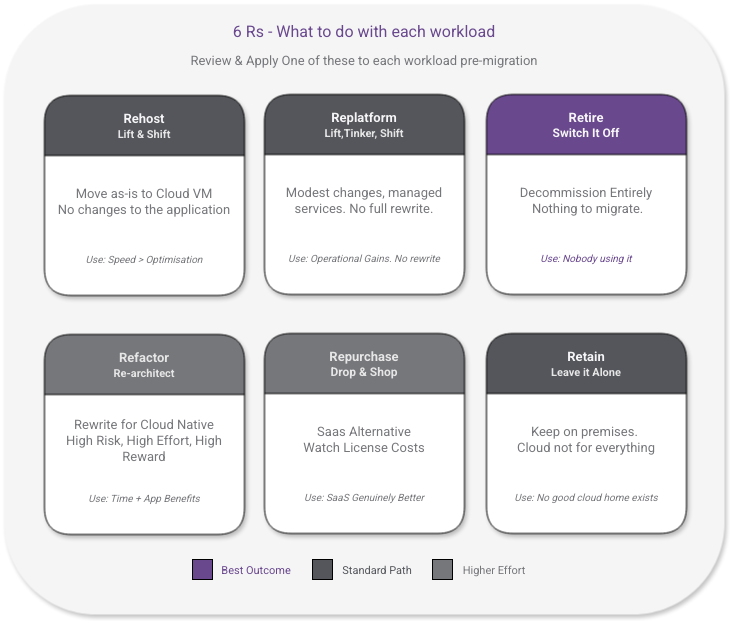
Rehost (“Lift and Shift”)
Take what you have, move it to cloud as-is. Same operating system, same application, now running on a cloud virtual machine instead of your on-premises server.
When it makes sense: Legacy applications that you can’t easily change, workloads where speed of migration matters more than cloud optimisation, or as a first step before you tackle the harder work of modernisation later.
The honest caveat: Lift and shift gets a bad reputation because organisations do it and then wonder why their cloud bill is higher than their on-premises costs. That’s because you’ve moved the workload without using any of the features that make cloud economically advantageous. A server running 24/7 in the cloud at full capacity isn’t cheaper than on-premises — it’s usually more expensive. If lift and shift is your strategy, go in with eyes open on the cost implications.
Replatform (“Lift, Tinker, and Shift”)
Move the workload to cloud with modest optimisations that don’t require rewriting the application. Migrate your on-premises MySQL database to a managed RDS or Azure SQL instance, for example. Same application, cloud-managed database instead of self-managed.
When it makes sense: You want some of the operational benefits of cloud (managed patching, backups, scaling) without the cost and risk of full refactoring. The sweet spot for many organisations.
Refactor / Re-architect
Rewrite or significantly restructure the application to take full advantage of cloud-native capabilities — containers, serverless, microservices, managed services throughout.
When it makes sense: When the application genuinely benefits from it and you have the skills and time to do it properly. Not as a default. The overhead is real; refactoring adds significant time, cost, and risk to a migration project.
The honest caveat: “Cloud-native” has become a goal in itself for some organisations. It isn’t. It’s an architectural approach that has genuine advantages for certain workloads and adds unnecessary complexity to others. Don’t refactor for its own sake.
Repurchase
Drop the existing application and move to a SaaS alternative. Ditch your on-premises CRM and move to Salesforce, for example.
When it makes sense: When the SaaS option is genuinely better for your use case and the migration and licence costs are justified. Watch the long-term SaaS pricing carefully though, what looks affordable in year one has a way of growing.
Retire
Turn it off. Some of what you find in your audit will be applications that nobody uses, processes that nobody depends on, and servers that nobody would notice if they disappeared.
This is often the most valuable outcome of a migration audit. Every workload you retire is a workload you don’t have to migrate, maintain, or pay cloud costs on. Be ruthless.
Retain
Keep it where it is. Some workloads have no good cloud home. Heavily licensed applications with complicated BYOL terms, workloads with genuine data sovereignty requirements that cloud can’t satisfy, or systems at end of life that aren’t worth the migration investment. Not everything should go to cloud. I’ve said it before and I’ll keep saying it!
Sequencing Matters More Than Speed
The instinct in most migration projects is to move quickly. Cloud is the future, the board is watching, let’s show momentum. I understand the pressure. Resist it.
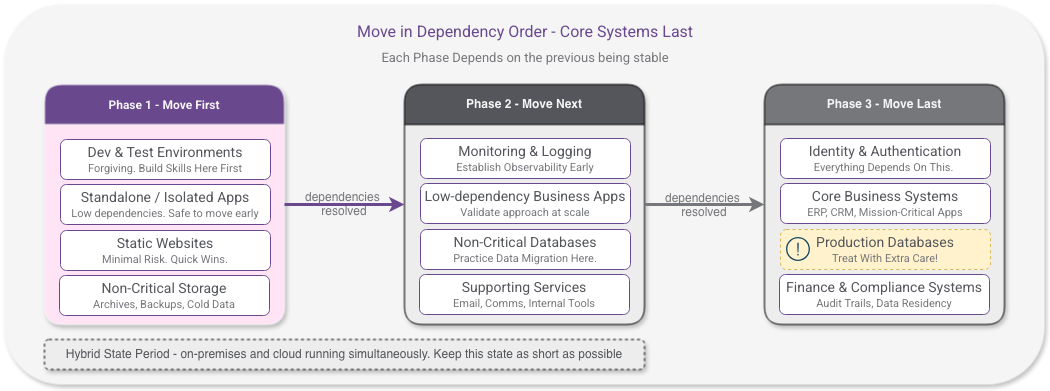
Migration sequencing — the order in which you move workloads — is one of the most important decisions you’ll make. Get it wrong and you’ll be unpicking dependency chains mid-migration, explaining to the business why a system that “shouldn’t have been affected” is now broken.
A sensible sequencing approach:
Start with low-dependency, low-risk workloads. Development and test environments are the classic starting point. They’re forgiving; if something goes wrong, the business impact is limited. They let your team build cloud skills and operational muscle before you’re touching production systems. And as covered in the cloud economics post, getting dev/test environments onto proper cloud scheduling immediately saves real money.
Move in dependency order. Map your dependencies first, then work from the leaves of the dependency tree inward toward the core. The worst migrations I’ve seen tried to move a core system before its dependencies, created a complex hybrid state, and then spent months untangling it.
Treat data with extra caution. Application tiers can be rebuilt. Data is harder. Plan data migration carefully; cutover timing, validation, rollback capability. A botched application migration is embarrassing; a botched data migration can be catastrophic.
Keep hybrid state periods short. There will be a phase where some workloads are on-premises and some are in cloud. That’s unavoidable. But that hybrid state adds complexity and cost. You’re running two environments, two sets of management tooling, two security perimeters to monitor. Plan your sequencing to minimise the duration of that phase.
A Note on AI: Don’t Let It Drive the Migration
This deserves a direct mention because it’s increasingly common. Organisations are using AI capability - access to managed AI services, large language models, machine learning platforms, as a primary justification for cloud migration. “We need to get to cloud so we can use AI.”
That’s not necessarily wrong, but it’s a dangerous framing if it drives sequencing and architecture decisions.
Here’s why: AI workloads have specific infrastructure constraints that are quite different from conventional application workloads. Hosting location decisions for AI are harder to reverse than they appear — the combination of model weights, data gravity, and regulatory requirements creates lock-in that makes conventional workload migration look straightforward by comparison. Cloud capacity for AI-optimised infrastructure is under real pressure right now across all three major providers.
More fundamentally, leading your migration with AI means you’re building on a foundation that isn’t yet solid. Get your core workloads migrated cleanly, your cost management in place, your security posture established. Then evaluate where AI genuinely adds value — not as a migration driver, but as a deliberate subsequent step on a stable platform.
The organisations that will get the most from AI in the cloud are the ones who treated it as a layer added to a well-run cloud environment, not as a reason to rush the migration in the first place.
The Plan Nobody Makes: Your Exit Strategy
Every cloud migration plan I’ve seen focuses entirely on getting into the cloud. Almost none of them plan for getting out.
That’s not pessimism. It’s basic risk management.
Before you commit to a provider and architecture, understand what it would take to leave. What data would need to move, in what format, at what cost? Which services have no equivalent on another platform? What’s your data egress bill if you need to move 50TB out in a hurry?
You may never use this plan. Hopefully you won’t. But the process of thinking through your exit forces two useful things: it highlights where you’re creating irreversible dependencies (worth knowing upfront), and it gives you genuine leverage in commercial negotiations with providers.
Knowing your exit cost is not the same as planning to exit. It’s the same discipline as reading an employment contract before you sign it. Just do it.
The Most Common Mistakes (So You Don’t Have to Make Them)
After years of watching cloud migrations succeed and fail, these are the patterns I see most often:
Underestimating the human side. Technology migrations are straightforward compared to the people and process changes they require. Teams need retraining. Processes that worked on-premises need rethinking. Operational runbooks need rewriting. This takes time and often gets under-resourced.
Moving everything at once. Big bang migrations are high risk. Phased approaches let you learn, adjust, and reduce the blast radius of mistakes. The temptation to draw a clean line between old and new is understandable but rarely worth it.
Ignoring networking. Connectivity between on-premises and cloud during the migration, and between cloud services after it, is consistently the source of unexpected complexity and cost. Model your network topology before you start moving workloads.
Skipping the cost model. As covered in the cloud economics post, the “just move it and see” approach to cloud costs is how organisations end up with bills that surprise their finance teams. Model the costs of what you’re moving before you move it.
Treating security as an afterthought. Cloud security is a different discipline from on-premises security. The shared responsibility model, identity management, network segmentation — these all need to be designed in from the start, not bolted on after you’ve already migrated. I’ll cover cloud security in depth in a dedicated post, but the principle is simple: plan it first, don’t retrofit it.
Over-architecting on day one. The perfect cloud architecture is an iterative destination, not a launch requirement. Start with something that works, that your team understands, and that you can operate. Optimise from there.
What a Good Migration Plan Actually Looks Like
Not a Gantt chart with two hundred tasks. Not a vendor methodology deck. Something you can actually follow:
- Discovery and audit — know what you have, what it costs, and what depends on what
- Categorise — apply the 6 Rs to each workload; retire what you can, identify what stays
- Sequence — low risk and low dependency first, build toward core systems
- Cost model — run real numbers on each phase before committing to it
- Skills assessment — know what training your team needs and build it in before they need it
- Security and compliance baseline — establish your cloud security posture before workloads arrive, not after
- Pilot — start with dev/test, learn, then proceed
- Iterate — each wave of migration informs the next; build in review points
What’s Next?
In the next post, I’ll pull back the curtain on the costs that cloud providers really don’t want to talk about — not the obvious ones like data egress that you’ve probably already heard about, but the deeper layer of costs that only become visible once you’re committed and the initial excitement has worn off.
_Working through a migration and want a second opinion? Drop me a line through the contact page.