Cloud Economics: The Real Costs Nobody Talks About
Uncovering the true cost of cloud, its hidden expenses, and when cloud actually saves money.
“Pay only for what you use,” “No upfront capital expenditure,” and similar mantras are common hooks used to get you to consider cloud. The providers deliberately position it this way to give you the impression cloud is cheaper. What isn’t emphasised: cloud can cost more than on-premises for many workloads. This is not because cloud is expensive, but because most organisations don’t understand the mechanics of cloud economics until they’re already committed. There’s a whole FinOps (Financial Operations) discipline to look at cloud costs, that’s how important understanding cloud economics has become!
Let’s explore that in more detail here.
The Marketing vs. Reality Gap
What vendors say: “Cloud reduces IT costs by 30-40%!”
What they don’t say: The cost reduction figure assumes you’re replacing over-provisioned infrastructure, leveraging elasticity, using reserved instances, constantly optimising, and have staff who understand cloud pricing models. Most organisations? They lift-and-shift everything, leave it running 24/7, and wonder why the bill keeps growing.
CapEx vs OpEx: More Than Accounting
Before diving into Capital Expenditure (CapEx) vs Operational Expenditure (OpEx) let’s take moment to review what these terms mean. CapEx refers to upfront costs on machines, buildings etc while for OpEx, there’s none of that malarky, it’s a case of paying for what you use on infrastructure owned by someone else.
What this means in real terms is cloud shifts costs from upfront CapEx to ongoing OpEx. Sounds great in theory but the reality is, it’s a trade-off.
On-Premises (CapEx Model):
- Large upfront investment in hardware
- Predictable ongoing costs (power, maintenance, staff)
- Depreciation over 3-5 years
- You own the assets
Cloud (OpEx Model):
- Zero upfront investment
- Pay-as-you-go monthly billing
- Costs can fluctuate (and grow)
- You own nothing
Neither is inherently better. It depends on your workload patterns and financial situation.
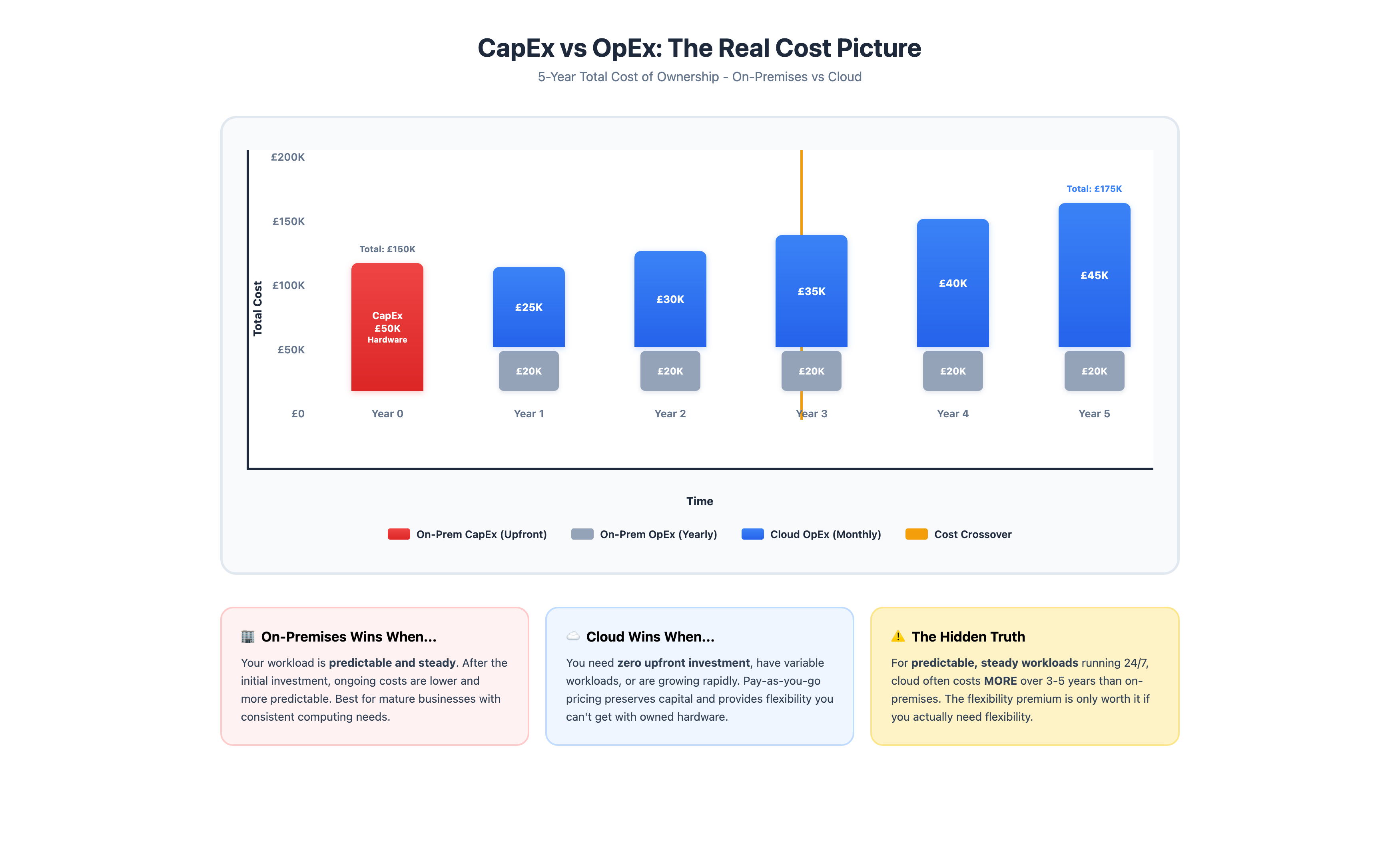
For predictable, always-on workloads, on-premises often wins on total cost over 5 years. Cloud eliminates upfront investment but charges a premium for that flexibility.
The 5-Year TCO Reality Check
Let’s compare a typical server workload over 5 years.
Scenario:
- 4 vCPU, 16GB RAM, 500GB storage
- Running 24/365
- Typical business application
On-Premises Total (5 Years): £150,000
- Hardware: £50,000 (server, networking, storage)
- Staff time: £45,000 (maintenance, patches, monitoring)
- Power & cooling: £22,500
- Software licenses: £20,000
- Maintenance contracts: £12,500
Cloud Total (5 Years): £175,000
- Compute: £87,500 (similar specs, pay-as-you-go)
- Storage & bandwidth: £43,750
- Management tools: £26,250
- Training & migration: £17,500
Cloud costs 17% more over 5 years for this steady-state workload.
But here’s the critical caveat: If your workload scales up and down (busy days, quiet weekends, seasonal spikes), or if you need geographic distribution, total cost of cloud drops significantly. The key is actually using cloud’s elasticity, not just running everything 24/7 like you did on-premises.
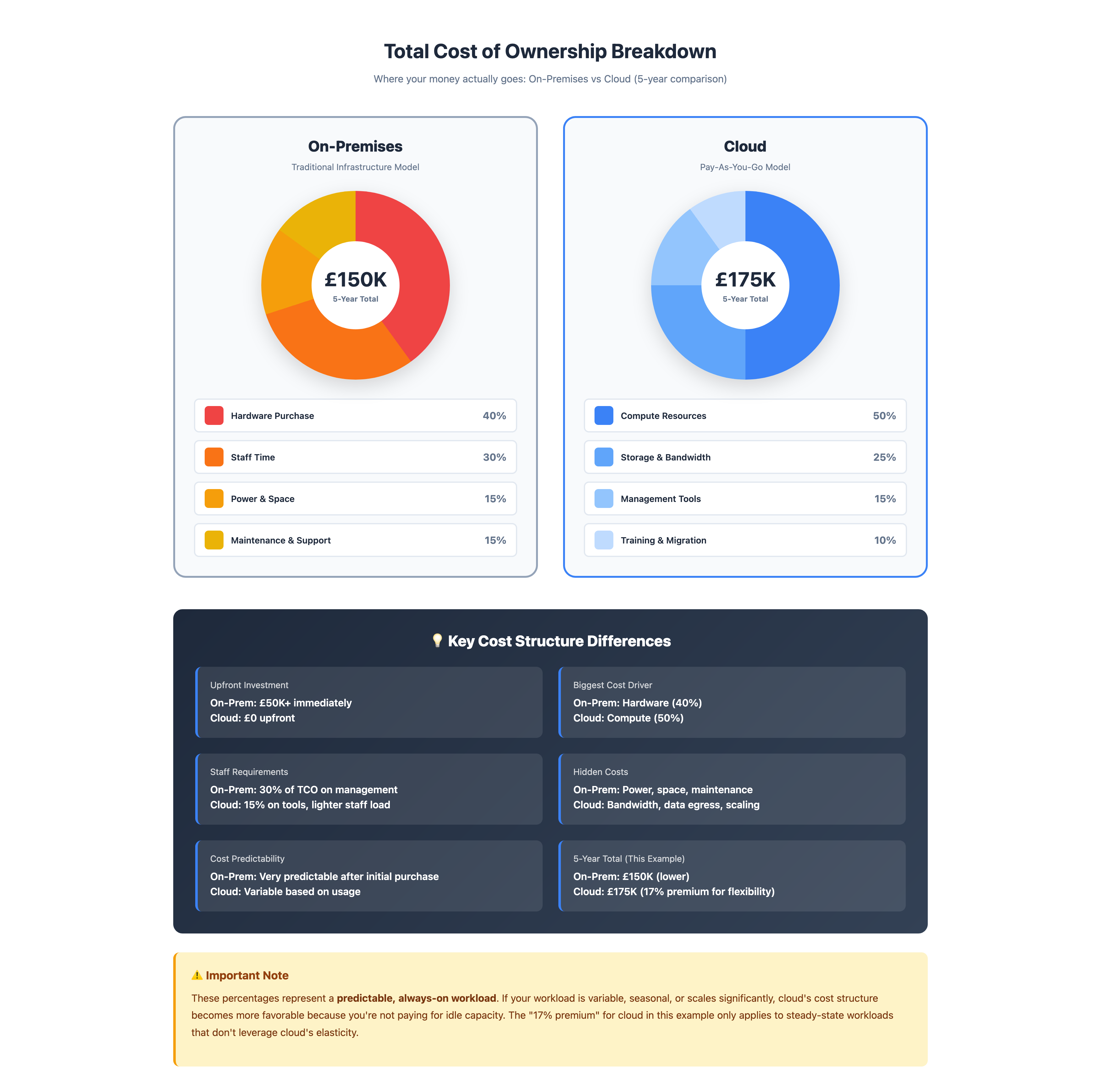
Where your money actually goes; On-premises is dominated by upfront hardware and ongoing staff costs. Cloud spreads costs over time but charges a premium for compute resources.
Hidden Costs: The Iceberg Below
Have you ever looked at the pricing sheets for cloud services? Everything is geared to look transparent but there are often catches that you’d never even considered. Let’s use data as an example.
Data Egress (The Silent Budget Killer)
Moving data into cloud is usually free. However, when it comes to moving data out of the cloud it can rapidly become expensive.
Real example:
- Storing 5TB in AWS S3: ~£115/month
- Transferring 5TB out monthly: ~£435/month
Getting the data into an S3 bucket is free but you pay for the privilege of storing your data in the cloud (£115/month x12 = £1,380pa). Then, if your back up strategy requires you to pull the full amount of data to local storage monthly, well that’s another £5,220pa (£435 x12) in bandwidth charges. That also assumes the data is never pulled for any transactional purposes or that ~£5,220 increases further.
Development/Testing Environments
On-premises, your development (dev) environment is “free” (it’s already paid for). In the cloud, every new dev instance is another line item. Three developers with test environments running 24/7? That’s additional instances costing real money monthly. What’s worse, if they don’t shut them down daily it’s wasting money!
Best practice: Automate dev/test environments to shut down outside of business hours. That one simple change can save ~65% on the cost of your development and test environments.
Regional Redundancy
Cloud is fantastic for being able to implement systems that provide high availability across multiple regions. This is great for the resilience of your system but that resilience comes at a cost, the expense of the cross-region replication.
- Data transfer between regions: £0.02/GB
- Database replication: Additional compute + storage costs
- Load balancing across regions: Extra charges
License Mobility
Let’s say you want to Bring Your Own Licences (BYOL) e.g. Windows or SQL Server, to the cloud. It’s possible but it’s complex. But to buy the same licence in the cloud is expensive, your £5,000 SQL Server licence now costs you £300/month (£3,600/year) in perpetuity.
Cloud Pricing Models Explained
On-Demand (Pay-As-You-Go)
How it works: Hourly or per-second billing. Start/stop anytime.
When to use:
- Variable workloads
- Short-term projects
- Testing and development
- Workloads with unpredictable patterns
Real cost: Most expensive per hour.
Reserved Instances (1-3 Year Commitments)
How it works: Commit to specific instance type for 1-3 years. Get 30-70% discount.
When to use:
- Steady-state workloads
- Production systems running 24/7
- Predictable capacity needs
Risk: You pay whether you use it or not. Over commit, you’re wasting money. Under commit, you’re paying on-demand rates for the excess you didn’t commit to.
Spot Instances (Unused Capacity)
How it works: Bid on unused cloud capacity. The cost savings here can be substantial, up to 90%, but be aware, your instances can be terminated with minimal notice.
When to use:
- Batch processing
- Data analysis
- Fault-tolerant workloads
- Non-time-critical tasks
Risk: Your instances can disappear during processing. This type of instance is really only suitable for interruptible workloads.
Savings Plans (Flexible Commitments)
How it works: Commit to spending £X/hour for 1-3 years. Get discounts across instance families and regions.
When to use:
- Dynamic workloads that change over time
- Organisations using multiple instance types
- Need flexibility with cost predictability
Benefit: More flexible than reserved instances, similar savings.
When Cloud Actually Saves Money
Let’s take a look at a few examples of when cloud isn’t more expensive. There are specific patterns to spot and being able to identify these will help you to decide whether cloud is right for the particular scenario you’re considering.
1. Variable Demand
Scenario: A retail business with holiday shopping surge.
On-premises: You would need to size infrastructure to ensure peak demand could be met. The issue, the capacity purchased sits idle rest of year. It’s wasting money.
Cloud: In the cloud you could run at lower capacity for the majority of the year and then seasonally scale up e.g. November & December, and then scale back down January - October. Pay for peak infrastructure only when you need to.
Savings: This has the potential to save you 40 - 60% compared to over-provisioned on-premises.
2. Geographic Distribution
Scenario: You’re a UK business expanding to US and Asia.
On-premises: You need to plan well in advance and then build or lease data centres in each region. This could take years to implement and requires millions in CapEx. What happens when the circumstances of the business change mid-build?
Cloud: This is where cloud shines. Decide to expand in other areas, you can deploy in 3 regions in hours and you’ll pay only for what you use in each location.
Savings: This significantly accelerates your time to market (hours vs years) and avoids the need for massive upfront investment.
3. Disaster Recovery
On-premises: Disaster Recovery (DR) in an on-premises setting requires double the amount of infrastructure (hot or cold site) which naturally doubles your upfront costs.
Cloud: In the cloud you can replicate the data to another region and spin that up only during disaster.
Savings: 70-80% savings vs. traditional DR.
4. Rapid Growth
Scenario: You’re a start-up that doubles in size every year.
On-premises: This requires a constant cycle of buying, installing, and configuring new hardware. It’s impossible to keep up and they’re always behind demand.
Cloud: As businesses scale, it’s easy to add capacity. It can be done in minutes and the growth if the business is not tied to the hardware lead time.
Value: Speed, flexibility and agility outweigh higher per-unit costs.
5. Development Velocity
Scenario: You’re a software company with 20 developers.
On-premises: On-premises this can lead to shared dev/test environments, queues for resources and slow development cycles.
Cloud: In the cloud, every developer can have an isolated environment which they can spin up/down as needed leading to much faster iteration.
Value: The productivity gains exceed higher infrastructure costs.
Cost Optimization Strategies
If you’re already in cloud (or committed to going), here’s how to control costs:
1. Right-Sizing (The Low-Hanging Fruit)
Most organisations over-provision by 30-50%. Running an 8-core instance when 4 cores would suffice wastes money constantly.
Action: Review CPU and memory utilization monthly. Right-size instances that consistently run below 40% utilization.
Savings: 20-30% reduction in compute costs.
2. Storage Lifecycle Policies
Not all data needs high-performance storage. Move infrequently accessed data to cheaper tiers automatically.
Storage tiers (AWS example):
- Standard: £0.023/GB/month (frequent access)
- Infrequent Access: £0.0125/GB/month (monthly access)
- Glacier: £0.004/GB/month (archival)
Action: Implement lifecycle policies. Move data >90 days old to Infrequent Access, >1 year to Glacier.
Savings: 50-80% on storage costs for old data.
3. Turn Off What You’re Not Using
Development servers running 24/7 on weekends? CI/CD test environments idle at night? You’re burning money.
Action: Automate shutdown of non-production resources outside business hours.
Typical schedule:
- Dev/test: Off weekends, off 7pm-7am weekdays
- Staging: On-demand only
- Production: 24/7 (obviously)
Savings: 65% reduction on non-production costs.
4. Use Reserved Instances Strategically
Reserve capacity for your baseline load. Use on-demand for variable peaks.
Example:
- Baseline: 10 instances 24/7 → Reserved (save 40%)
- Peak: Additional 5 instances during business hours → On-demand
- Spot: Batch jobs → Spot instances (save 70%)
Savings: 30-40% overall compute reduction.
5. Monitor and Alert Aggressively
Set up billing alerts at multiple thresholds. Review costs weekly, not monthly.
Alerts to set:
- 50% of monthly budget
- 75% of monthly budget
- 90% of monthly budget
- Any single resource >£100/day
Action: Investigate immediately when alerts trigger. Find the zombie resource before it costs thousands.
The Budget Reality
Here’s what nobody tells you, budget 20-30% above estimates for your first year in cloud.
Why? You’re learning how it works and you’ll make mistakes such as:
- Forgetting to turn off test environments
- Misconfiguring auto-scaling (scales up, doesn’t scale down)
- Over-provisioning “just in case”
- Underestimating data egress costs
- Deploying in expensive regions by accident
This isn’t pessimism. It’s reality. Every organisation goes through this learning curve. Plan for it financially.
Year 1: Learning, likely overspending Year 2: Optimisation, costs come down 15-20% Year 3+: Efficient operations, predictable costs
Red Flags: When Cloud Doesn’t Make Sense
Cloud isn’t always the answer. Walk away when:
Your Workload is Predictable and Steady
Running 10 servers 24/7 with consistent load? On-premises is probably cheaper. Cloud’s flexibility premium doesn’t benefit you.
Data Sovereignty is Non-Negotiable
Need absolute certainty that data never leaves UK jurisdiction? Cloud makes this complex. Possible, but you’ll pay premium for UK-only regions and lose some flexibility.
You Have Existing Hardware with Useful Life
Servers only 2 years old with 3+ years left? Migrating to cloud now means eating the sunk cost and paying cloud premiums. Wait until hardware refresh cycle.
Budget is Genuinely Fixed and Constrained
Can’t absorb 10-20% cost variance month-to-month? Cloud’s variable billing could create problems. On-premises offers cost predictability.
You Lack Cloud Skills (and Can’t Hire/Train)
Cloud isn’t “easier” than on-premises. It’s different. Without proper skills, you’ll overspend massively or misconfigure critically. If you can’t build cloud competency, don’t migrate yet.
Making the Economics Work: Decision Framework
Before committing to cloud (or staying on-premises), answer these questions honestly:
1. What’s our workload pattern?
- Steady 24/7 → On-premises likely cheaper
- Variable/seasonal → Cloud probably wins
- Growing rapidly → Cloud provides flexibility
2. What’s our risk tolerance for variable costs?
- Need predictability → On-premises or reserved cloud
- Can handle variance → On-demand cloud acceptable
3. Do we have cloud skills?
- Yes → Ready to optimize, control costs
- No → High risk of overspending, need training first
4. What’s our strategic direction?
- Stable, mature business → Either works fine
- Growth mode → Cloud flexibility valuable
- Innovation-focused → Cloud speed to market wins
5. What’s our true TCO over 5 years?
- Run actual numbers for your workload
- Include hidden costs (egress, licensing, training)
- Compare realistic scenarios, not best-case
The Uncomfortable Truth
Cloud economics aren’t universally favorable. For many workloads; predictable, steady-state, business-critical, on-premises is genuinely cheaper over 5 years.
But “cheaper” isn’t the only factor. You also need to consider:
- Speed of deployment
- Geographic reach
- Disaster recovery
- Flexibility for growth
- Avoiding hardware refresh cycles
Sometimes paying a premium for flexibility is the right business decision. Sometimes it’s not.
The key is making that decision with your eyes open, based on real numbers, not marketing promises.
What’s Next?
Understanding cloud economics is step one. Actually controlling costs requires ongoing discipline:
- Monthly cost reviews (not quarterly)
- Automated resource cleanup
- Right-sizing as workloads evolve
- Reserved instance planning
- Storage lifecycle management
- Team training on cost awareness
Cloud economics aren’t set-and-forget. They’re an ongoing operational concern.
Want to dive deeper?
Download the Cloud Readiness Assessment
Want to model the real numbers? This companion guide includes a fillable TCO comparison framework for on-premises vs cloud costs, a hidden costs checklist covering the 12 items most businesses miss, and a scored readiness evaluation.
Download the Cost FrameworkHave questions about cloud costs for your business? Get in touch for a no-obligation discussion. I can help you run real numbers, not vendor estimates.