What Is 'The Cloud'? (And Why Everyone Pretends to Know)
Cutting through the marketing waffle to explain what cloud really is and what it is not!
Elephants, Server Rooms or Magic Ether
Line up ten people and ask them what the term “cloud computing” means and you’ll get ten different answers.
The truth; half the people confidently using the term “cloud computing” in meetings have no bloody idea what it actually means. Unfortunately, this can and does occasionally include those selling it to you.
I’ve seen presentations where “cloud” meant everything from “those fluffy things in the sky” to “software with a web interface” to “the thing which makes files magically appear on all my devices.”
I’ve watched sales teams use “cloud-native,” “cloud-enabled,” and “cloud-ready” interchangeably, as if adding “cloud” to anything automatically makes the technology cloud.
Before posting about whether you should move to the cloud, what it costs, how to choose a provider or anything else cloud related, I need to establish what is actually being discussed. Making informed decisions about something that is not well understood is how businesses end up paying for services they don’t need and missing opportunities they didn’t know existed.
What Is Cloud: The Honest Definition
For any service to be considered cloud IT MUST exhibit each of the following five characteristics1:
- On-Demand Self-Service - users can serve themselves and ask for whatever they want
- Broad Network Access - users access the service over the network through standard mechanisms e.g. mobiles, tablets, laptops
- Resource Pooling - resources are pooled to serve multiple customers
- Rapid Elasticity - resource availability is automatically adjusted to meet demand and to the end-user seems almost unlimited
- Measured Service - provides the ability to charge customers for what they use
In most circumstances, some (or all) of cloud computing demand is serviced across the public internet.
That’s it. Five core characteristics and one main delivery method.
Everything else, the service models, deployment types, and vendor features, are variations on this theme. But the fundamental shift is from owning your infrastructure to renting access to someone else’s infrastructure.
What Cloud Is Not
It’s not magic. Your data isn’t floating in some ethereal digital atmosphere. It’s sitting on physical servers in physical data centres, consuming real electricity and generating real heat. “The cloud” is just a marketing-friendly way of saying “not on your servers.”
It’s not automatically better. Cloud has advantages, but it’s not inherently superior to on-premises infrastructure. It’s a different model with different trade-offs. Anyone telling you “cloud is always the answer” is either ignorant or possibly wants to sell you something.
It’s not free. Yes, there are free tiers. No, you won’t stay in them once you’re doing anything meaningful. And yes, cloud can absolutely cost more than on-premises if you’re not careful.
It’s not infinitely scalable. Every cloud provider has limits. You can scale to tremendous sizes, but you’re still bound by physics, provider quotas, and most importantly the depth of your wallet or credit limit.
It’s not a backup plan by itself. Putting your data in the cloud doesn’t mean it’s automatically backed up. You still need a proper backup strategy. Deleting something in the cloud means it’s deleted the same as if you’d deleted it from your own server.
A Whistle Stop Tour Of How We Got To Cloud Computing (No I’m Not Auditioning To Be Tour Guides)
Let’s go back to where it all started.
The Before Times: Traditional IT
Traditionally, if you needed computing resources, you:
- Bought physical servers
- Set up a server room or rented data centre space
- Installed and configured everything yourself
- Maintained, updated, and replaced it all
- Paid upfront capital costs and ongoing operational costs
This meant you planned for peak capacity (expensive and mostly idle) or risked running out of resources during busy periods. Growth required months of planning and capital investment. Disaster recovery meant maintaining duplicate infrastructure.
The Intermediate Era: Virtualisation
Virtualisation technology allowed running multiple “virtual” servers on a single physical machine. This improved efficiency, but you still owned and managed the hardware. It was better, but it didn’t fundamentally change the model.
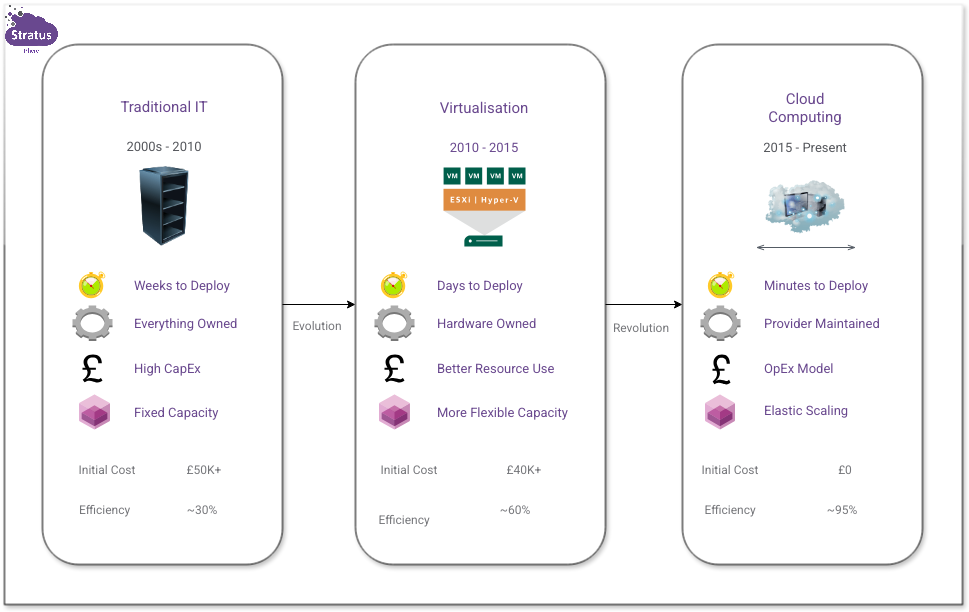 The journey from physical servers to cloud computing
The Cloud Era: On-Demand Computing
Cloud providers took virtualisation to its next logical evolution: massive data centres with thousands of servers, sophisticated orchestration systems, and the ability to rent compute power by the hour or even by the second.
Suddenly, you could:
- Provision a server in minutes instead of weeks
- Pay only for what you actually used
- Scale up for busy periods and scale down when quiet
- Access enterprise-grade infrastructure without enterprise capital budgets
- Focus on your business instead of managing servers
This is the fundamental value proposition of cloud: converting capital expense into operational expense, and gaining flexibility in the process.
Cloud Service Models
Unfortunately, this requires dealing with a bunch of acronyms to effectively describe the cloud service models because that’s what industry uses. Cloud computing comes in three main service models. Each model represents a different level of service and responsibility. In the hotel world you might think of it like bed and breakfast, half-board and all-inclusive. What you’re paying for here is different rental agreements for your computing resources. We have:
- IaaS to represent Infrastructure as a Service
- PaaS to represent Platform as a Service
- SaaS to represent Software as a Service
Infrastructure as a Service (IaaS)
What it is: You rent virtualised computing resources—servers, storage, networking—and manage everything built on top of them.
The analogy: Renting an empty office space. You get the building and utilities, but you bring your own furniture, equipment, and staff.
You manage: Operating systems, applications, data, middleware, runtime environments
Provider manages: Physical hardware, virtualisation, networking infrastructure, data centre facilities
Examples: Amazon EC2, Microsoft Azure Virtual Machines, Google Compute Engine
When it makes sense: When you need control over your environment, have existing applications to migrate, or have specific configuration requirements.
Platform as a Service (PaaS)
What it is: You rent a platform for developing and running applications, without managing the underlying infrastructure.
The analogy: Renting a furnished, serviced office. You bring your work, but the space, furniture, and basic services are provided and maintained.
You manage: Applications and data
Provider manages: Operating systems, runtime environments, middleware, servers, storage, networking, everything below your application
Examples: Heroku, Google App Engine, Microsoft Azure App Service, AWS Elastic Beanstalk
When it makes sense: When you want to focus purely on building applications without worrying about infrastructure management.
Software as a Service (SaaS)
What it is: You use software applications delivered over the internet, managing nothing except your usage and data.
The analogy: Using a co-working space like WeWork. Everything is provided, managed, and maintained. You just show up and work.
You manage: Your data and how you use the application
Provider manages: Everything—applications, data infrastructure, platforms, operating systems, physical hardware
Examples: Microsoft 365, Google Workspace, Salesforce, Slack, Xero
When it makes sense: When you need specific functionality without any desire to manage the underlying technology. This is probably what most people actually mean when they say they’re “using the cloud.”
Download the Cloud Decision Tree
Not sure which cloud model fits? This printable guide walks you through the key questions, compares IaaS vs PaaS vs SaaS across seven factors, and includes real-world scenarios showing what other businesses chose.
Download the Decision TreeThe Shared Responsibility Model
This is the most important concept to understand. Unlike traditional IT, security in the cloud is a shared responsibility hence the Shared Responsibility Model (SRM). In addition to cloud security being a shared responsibility, it is VITAL to understand that responsibility changes depending on which model of cloud computing you are using. Larger organisations are likely to be using a mixture of models so will need to have a very good grasp of what they are responsible for under each model.
- IaaS: provides you with maximum control, and also the most security responsibility
- PaaS: provides more balanced control and convenience with less security responsibility
- SaaS: provides you with the least control, and also with the least security responsibility
There is no universal “best fit” model. It depends on your needs, capabilities, and what you’re trying to accomplish.
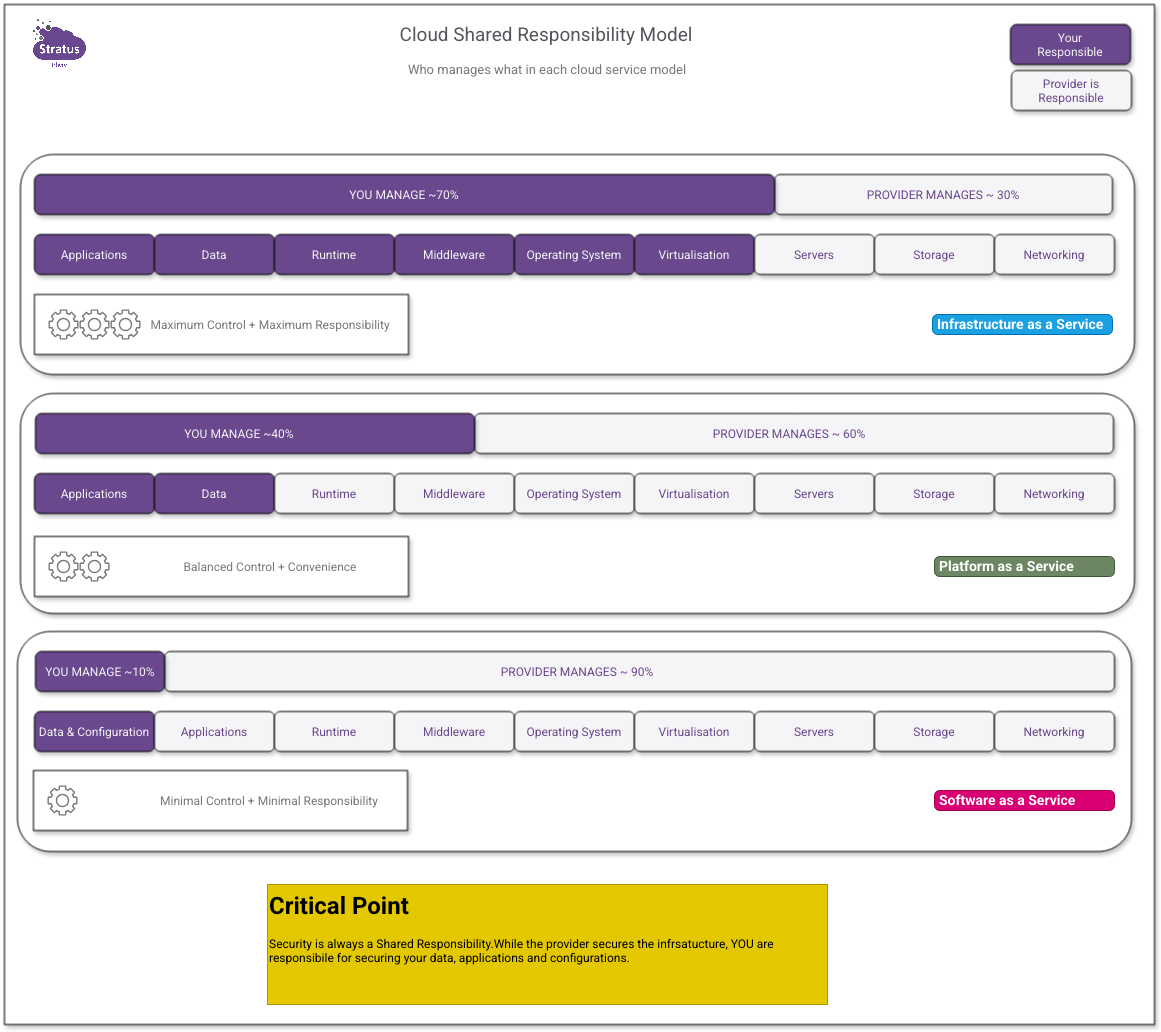 Understanding who manages what in IaaS, PaaS, and SaaS
The Flavours of Cloud: Deployment Models
Beyond service models, there are different ways cloud infrastructure can be deployed and accessed.
Public Cloud
What it is: Infrastructure owned and operated by a third-party provider, shared among multiple customers (but logically isolated).
Characteristics:
- Accessed over the public internet
- Pay-as-you-go pricing
- No upfront hardware investment
- Shared infrastructure (multi-tenant)
- Managed and maintained by provider
Major providers: AWS, Microsoft Azure, Google Cloud Platform (GCP), Oracle Cloud, IBM Cloud
Best for: Most businesses needing scalability and flexibility without capital investment, from startups to mid-size organisations
Private Cloud
What it is: Infrastructure dedicated to a single organisation, either hosted on-premises or by a third party.
Characteristics:
- Not shared with other organisations
- More control over environment and security
- Typically higher costs
- May be on-premises or hosted
- Organisation retains more management responsibility
Best for: Organisations with strict regulatory requirements, specific security needs, or predictable workloads where economics favour ownership
Hybrid Cloud
What it is: Combination of public and private cloud, with orchestration between them.
Characteristics:
- Some workloads in public cloud, others private
- Data and applications can move between environments
- Balances control, cost, and flexibility
- More complex to manage
Best for: Organisations transitioning to cloud, with mixed requirements, or needing to keep some data on-premises whilst leveraging public cloud benefits
Multi-Cloud
What it is: Using multiple public cloud providers (e.g., both AWS and Azure).
Characteristics:
- Avoids vendor lock-in
- Can use best services from each provider
- More complex management
- Requires expertise in multiple platforms
Reality check: Multi-cloud sounds great in theory but adds significant complexity. For the majority of businesses, mastering one platform before considering multi-cloud is the sage approach.
Community Cloud
What it is: Infrastructure shared by several organisations with common concerns (security, compliance, jurisdiction), managed internally or by a third party.
Characteristics:
- Shared among organisations with similar requirements
- More control than public cloud, less cost than private
- Often sector-specific (e.g., government, healthcare, finance)
- May meet specific regulatory requirements
Best for: Organisations in regulated industries needing to share infrastructure whilst maintaining higher security/compliance than public cloud offers. UK government’s G-Cloud is an example.
Sovereign Cloud
What it is: Cloud infrastructure physically located within a specific country/jurisdiction, ensuring data residency and compliance with local regulations.
Characteristics:
- Data stays within national borders
- Subject to local laws and regulations
- May use local providers or international providers with local data centres
- Addresses data sovereignty concerns
Best for: Organisations with strict data residency requirements, government/public sector, businesses in countries with strict data localisation laws (e.g., Germany, Russia, China).
UK Context: Post-Brexit, some UK organisations prefer UK-based data centres to avoid EU GDPR complications. AWS has London regions, Azure has UK South/West, etc.
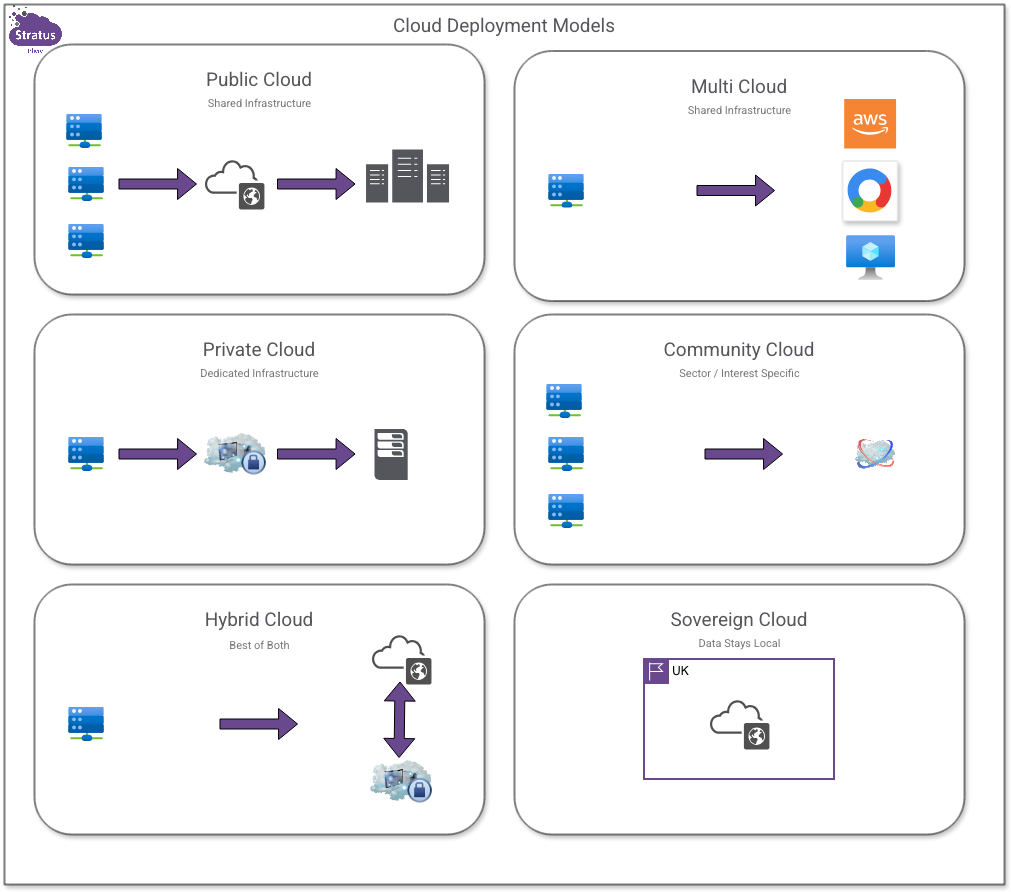 Six ways to deploy cloud infrastructure
Myths That Cost You Money
Let’s look at some common misconceptions that lead to poor decisions and wasted budget.
Myth 1: “Moving to the cloud saves money”
Reality: Cloud can save money, but it’s not automatic. Poor planning, misconfiguration, and lack of optimisation often result in higher costs than on-premises. The cost benefit comes from not needing upfront capital, paying only for what you use, and avoiding maintenance overhead, but you need to actively manage costs.
Myth 2: “Cloud is more secure than on-premises”
Reality: The cloud provider’s infrastructure is typically very secure. Your configuration of it? That’s on you. The vast majority of cloud breaches are still caused by misconfiguration, not provider vulnerabilities. You’re moving from one set of security challenges to a different set.
Myth 3: “Cloud means you can scale infinitely”
Reality: You can scale to very large sizes, but there are practical and economic limits. Massive scale requires architectural decisions to support it, and costs scale with usage. Infinite scale requires infinite budget.
Myth 4: “Everything should be in the cloud”
Reality: Some workloads are genuinely better on-premises. Predictable, steady workloads that don’t need to scale, applications with specific latency requirements, or scenarios where you already own paid-for hardware might be better served keeping things as they are.
Myth 5: “Cloud migration is quick and easy”
Reality: “Lift and shift” (moving existing workloads to cloud without changes) is possible but rarely optimal. Proper cloud migration involves assessment, planning, possible re-architecting, testing, and optimisation. It takes time and expertise. Pure “lift and shift” is often most costly.
Myth 6: “The cloud is only for IT people”
Reality: Cloud computing impacts how an entire business operates. It affects costs, capabilities, security, compliance, and competitive positioning. It’s a business decision that requires IT expertise, not an IT decision that business leadership can ignore.
Why Understanding This Actually Matters
You might be thinking, “This is all very educational, but why do I need to know the difference between IaaS and PaaS? Can’t I just hire someone to handle it?”
Yes, you can hire expertise. But understanding these fundamentals helps you:
Make Better Buying Decisions
- Recognise when vendors are overselling or offering the wrong solution
- Ask intelligent questions that reveal whether consultants actually know their stuff
- Evaluate proposals and recommendations with critical thinking
Avoid Expensive Mistakes
- Understand why that “simple migration” turned into a six-month project
- Recognise which problems are yours to solve vs. the provider’s responsibility
- Make informed trade-offs between control, convenience, and cost
Plan Realistically
- Set appropriate budgets that account for actual cloud costs
- Create realistic timelines for migration projects
- Understand what capabilities you need in-house vs. what you can outsource
Communicate Effectively
- Speak the same language as your IT team or consultants
- Explain cloud decisions to stakeholders, board members, or investors
- Identify when people are using buzzwords to hide lack of understanding
What’s Next?
Now that you understand what cloud computing actually is, the next question is obvious: Why should you move to the cloud?
That’s what I’ll tackle in the next post. I’ll look at the legitimate reasons to consider cloud (not the marketing reasons), when staying on-premises makes more sense, and the honest trade-offs involved in making this decision.
Understanding what cloud is doesn’t automatically mean you need it.
Next in this series: “Why Consider Cloud? (And When You Probably Shouldn’t)” - Explores real business case for cloud computing, cuts through the hype, and helps you determine if cloud migration actually makes sense for your business.
NIST Special Publication 800-145, “The NIST Definition of Cloud Computing” ↩︎