Why Cloud? (And When You Probably Shouldn't)
Reasons you should consider cloud versus those when it's a complete non-starter.
The Honest Truth
Cloud isn’t always the answer. There, I’ve said it!
Not everyone will tell you this. It’s a very rare admission. But it is the truth.
Sometimes your current setup is perfectly fine. Sometimes it’s actually better. Sometimes the “cloud migration” being pushed would cost you more money, create more problems, and deliver fewer benefits than maintaining what you’ve already got.
However, here’s the equally uncomfortable truth for the “cloud skeptics” out there, sometimes staying on-premises is simply stubbornness dressed up as prudence. Sometimes it’s fear of change masquerading as careful risk management. Sometimes it’s IT teams protecting their comfort zones or executives avoiding decisions.
In this post I’ll cut through the cloud evangelism and the cloud resistance, and look at the actual business case. Not the marketing version. Not the “this is how we’ve always done it” version. The real reasons why you should and should not consider cloud.
Real Reasons to Consider Cloud
There are some really compelling business benefits cloud can bring to many businesses. This is not an “everyone else is doing it” so it must be the right approach slant. Nor is it the expert “analysts” recommend it so it must be right slant. The following are basic and easy to digest business benefits.
1. Operational Expenses not Capital Expenses
What this actually means: Instead of buying servers, buildings and a whole load of other kit upfront (capital expense), you pay on a monthly for what you use (operational expense).
When this matters:
- You don’t have £50K to spend on infrastructure right now
- You’d rather invest capital in growing the business than IT hardware
- You want to preserve cash flow and credit facilities
- Your accountant prefers operational expenses for tax reasons
- You’re avoiding the “buy for peak, waste during normal” problem
When this doesn’t matter:
- You’ve already got paid-for hardware that works fine
- Your workload is steady and predictable (OpEx might cost more long-term)
- You have capital budgets but tight operational budgets
- You’re in a mature, stable business with no growth plans
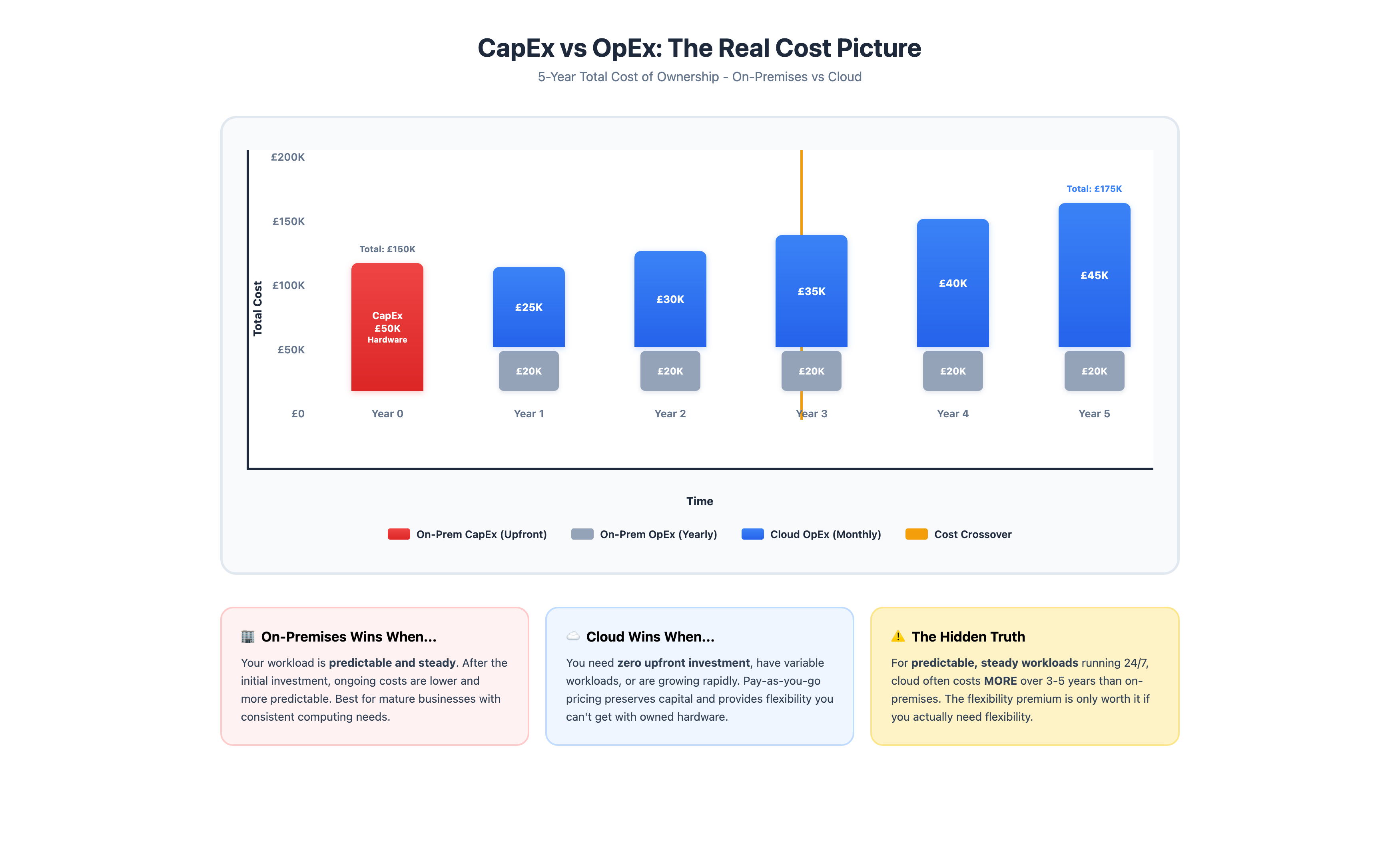
The graph above shows a critical truth: for predictable, always-on workloads, cloud often costs MORE over 3-5 years. The “flexibility premium” is only worth it if you actually need flexibility.
2. Scalability and Elasticity
What this actually means: You can increase (or decrease) resources quickly as demand changes, paying only for what you actually use.
When this matters:
- Your demand is variable or seasonal (e-commerce, retail, events)
- You’re growing rapidly and can’t predict next year’s capacity needs
- You launch new products or services where demand is uncertain
- You need to handle occasional spikes without maintaining idle capacity
- You want to test new initiatives without major infrastructure investment
When this doesn’t matter:
- Your workload is consistent and predictable year-round
- You’re not growing significantly
- Peak usage is only marginally higher than baseline (the cloud premium simply isn’t worth it)
- Scaling means adding users, not computational resources
Reality check: “Elastic scalability” sounds brilliant until you realise your application wasn’t built to scale horizontally, your database is a bottleneck, or you’re paying for rapid scale-up/scale-down that you rarely actually use.
3. Geographic Reach Without Physical Presence
What this actually means: You can deploy applications and services in multiple regions globally without building or renting data centre space in each location.
When this matters:
- You’re expanding internationally and need local presence
- You have users distributed globally who need low-latency access
- You need disaster recovery in geographically separate locations
- Compliance requires data to be stored in specific countries
- You want to test new markets without infrastructure commitment
When this doesn’t matter:
- All your users are in one region or country
- Latency isn’t critical to your service
- You don’t have international expansion plans
- Your business is fundamentally local
Sovereign Cloud: as counter-argument and consideration for when your users are in one region, your data needs to stay within that region and cloud offers some advantages, sovereign cloud could be the answer.
4. Access to Enterprise-Grade Tools Without the Enterprise Price Tag
What this actually means: You can use sophisticated services (machine learning, data analytics, Content Delivery Network (CDN), DDoS protection) that would be prohibitively expensive to build yourself.
When this matters:
- You need capabilities beyond basic compute and storage
- You want to use AI/ML without hiring data scientists
- You need enterprise-grade security tools without the associated enterprise costs
- You benefit from managed services (databases, caching, queuing)
- You want to experiment with advanced technologies affordably
When this doesn’t matter:
- Your needs are genuinely basic (file storage, email, simple applications)
- You don’t have the expertise to utilise advanced services anyway
- You’re already getting what you need from your current setup
- The “enterprise-grade tools” are solving problems you don’t have
5. Disaster Recovery and Business Continuity
What this actually means: Cloud makes it economically feasible to maintain backup systems and data in separate locations, without duplicating your entire infrastructure.
When this matters:
- Downtime genuinely costs you money or reputation
- You can’t afford (or justify) maintaining duplicate infrastructure
- Compliance requires disaster recovery capabilities
- Your current backup strategy is “hope nothing breaks”
- You need to meet specific recovery time (how long can you survive without service) /recovery point (how much data you can afford to be without) objectives
When this doesn’t matter:
- Brief downtime doesn’t materially impact your business
- You’ve already got robust on-premises DR in place
- Your data is easily recreatable or not particularly critical
- The cost of cloud DR exceeds the cost of potential downtime
6. Focus on Core Business, Not Infrastructure
What this actually means: Someone else handles hardware failures, capacity planning, updates, and infrastructure maintenance, freeing your time and people for business-focused work.
When this matters:
- You’re spending significant time/money on infrastructure management
- IT maintenance is pulling resources from strategic initiatives
- You don’t want to hire specialists for infrastructure management
- Your team’s expertise is better used elsewhere
- Finding and retaining infrastructure talent is difficult in your location
When this doesn’t matter:
- You enjoy managing your own infrastructure
- You’ve got excellent IT staff who are underutilised
- Your infrastructure is simple and stable (minimal management needed)
- Control over your environment is strategically important
- You’ve already made the infrastructure investment
Interesting Claims Made About Cloud
Cloud has become big business and for many it is now a staple part of their day-to-day operations. However, there are some benefits attributed to cloud which, when analysed, don’t really hold up to scrutiny. I examine some of those here.
“Cloud is more innovative”
Translation: It’s newer, so it must be better.
Reality: Innovation happens everywhere. Some of the most innovative companies run on-premises. Some cloud-based companies are running outdated applications on modern infrastructure. The innovation is in how you use technology, not where it’s hosted.
“Cloud is digital transformation”
Translation: Buzzword nonsense.
Reality: Digital transformation is about changing how your business operates and delivers value. Moving your existing applications to cloud without changing anything else isn’t transformation, it’s an expensive migration. Actual transformation requires rethinking processes, which you can do on-premises or in the cloud.
“Everyone’s moving to the cloud”
Translation: Peer pressure dressed up as a strategy.
Reality: Lots of companies are also staying on-premises. Many are running hybrid environments. Some are even moving back from cloud (cloud repatriation is a real thing). Do what makes sense for your business, not what makes for good conference presentations.
“Cloud is the future”
Translation: If you don’t do this, you’re obsolete.
Reality: Cloud is a future, not the future. For many workloads and businesses, on-premises or hybrid approaches will remain perfectly viable for decades. The future is about using the right tools for the job, wherever they are.
“You need to be cloud-first”
Translation: Make every decision assuming cloud is the answer.
Reality: You need to be “best solution-first.” Sometimes that’s cloud. Sometimes it’s on-premises. Sometimes it’s SaaS. Sometimes it’s a spreadsheet and good processes. Cloud-first policies often lead to square-peg-round-hole thinking and wasted money.
When Staying On-Premises Makes More Sense
So keeping all of that in mind, what are the reasons you’re better off keeping the status quo.
1. Predictable, Steady Workloads
If your computing needs are consistent and predictable, the economics of cloud often work against you. You paying a premium for flexibility you don’t need. Running your own hardware might cost less over a 3-5 year period.
Example scenarios:
- Line-of-business applications with consistent user counts
- Internal systems with predictable usage patterns
- Batch processing that runs on a schedule
- Applications that max out steady resources but don’t need to scale
2. Existing Investment That Works
If you’ve got servers that are paid for, working well, and meeting your needs, “because cloud” isn’t a reason to replace them. Run them until they need replacing, then evaluate cloud.
Questions to ask:
- Is our current infrastructure causing problems?
- Are we approaching end-of-life on critical equipment?
- Are maintenance costs becoming prohibitive?
- Are we unable to meet business needs with our current setup?
If the answers are mostly “no,” you might not need to change anything.
3. Regulatory or Compliance Requirements
Some industries, countries, or data types have requirements that make cloud more complicated or expensive than on-premises.
Considerations:
- Data sovereignty requirements (must be in specific country)
- Industry-specific regulations (financial services, healthcare)
- Compliance costs for cloud might exceed on-premises costs
- Audit and certification requirements
- Contractual obligations to customers about data location
Cloud can meet these requirements, but sometimes on-premises is simpler and cheaper.
4. Specific Performance Requirements
Some workloads have performance characteristics that cloud doesn’t handle well without significant cost.
Examples:
- Ultra-low latency requirements
- Very high-performance computing needs
- Massive data transfer requirements (bandwidth costs add up)
- Applications that need specific hardware configurations
- Real-time processing where network latency matters
5. Cost Analysis Favours On-Premises
If you’ve done proper total cost of ownership (TCO) analysis, not just comparing hardware costs to cloud quotes, and on-premises wins, that’s a legitimate reason.
Make sure you’ve included:
- Staff time for management and maintenance
- Power and cooling costs
- Space/facility costs
- Redundancy and disaster recovery
- Upgrade and refresh cycles
- Opportunity costs
If on-premises is still cheaper over 3-5 years and you’re happy with the trade-offs, stay where you are.
The Hybrid Reality: It’s Not All-or-Nothing
Outside of cloud evangelism and cloud skepticism there exists another, not too often talked about, option whereby you choose neither solely cloud or solely on-premises. Hybrid approaches are sometimes the most practical approaches of all.
What Hybrid Actually Looks Like
Keep on-premises:
Look at when you have and under the following circumstances keep things as they are:
- Core, stable applications that work fine
- Data that must stay local for regulatory reasons
- Workloads where you’ve already made the investment
- Systems with specific performance requirements
Move to cloud:
The things in a hybrid approach which you would consider using cloud for include:
- New applications and services
- Variable or seasonal workloads
- Disaster recovery and backup
- Development and testing environments
- Geographic expansion needs
Use SaaS for:
Cloud doesn’t have to mean build it yourself. You can consume cloud based software someone else has already built. Consider the use of SaaS tools for the likes of:
- Email and collaboration tools
- Customer Relationship Management (CRM) and business applications
- Human Resources (HR) and payroll systems
- Any functionality where building/hosting yourself provides no tangible competitive advantage
Before deciding hybrid is the right approach, consider the following benefits and challenges associated with a hybrid model.
Benefits of Hybrid
- Start small, prove value, expand gradually
- Avoid “big bang” migration risks
- Keep what works, improve what doesn’t
- Learn cloud whilst maintaining stability
- Optimise costs by using each model where it makes sense
Challenges of Hybrid
- More complex to manage than single approach
- Need connectivity between environments
- Requires expertise in multiple platforms
- Potential security complexity
- May be a stepping stone rather than end state
Making the Decision: A Framework
So how do you actually decide? Here’s a practical framework that goes beyond “what does the sales team recommend?”
Step 1: Assess Current State
Inventory what you’ve got:
- What systems and applications are you running?
- What infrastructure do you own?
- What are current costs (total, not just hardware)?
- What works well? What causes problems?
- What’s approaching end-of-life?
Evaluate current pain points:
- Capacity constraints?
- Management overhead?
- Disaster recovery gaps?
- Scalability limitations?
- Staff expertise gaps?
Step 2: Define Business Drivers
Why are you considering this?
- Business growth plans?
- Cost reduction goals?
- New capabilities needed?
- Risk mitigation?
- Competitive pressure?
- Technology refresh cycle?
Be honest: If the answer is “because everyone else is” or “the board asked about it,” that’s not a driver, that’s an inquiry. You need actual business reasons.
Step 3: Evaluate Workload Characteristics
For each major system, assess:
- Predictable or variable demand?
- Performance requirements?
- Data sensitivity and compliance needs?
- Interdependencies with other systems?
- Age and condition of current infrastructure?
- Criticality to business operations?
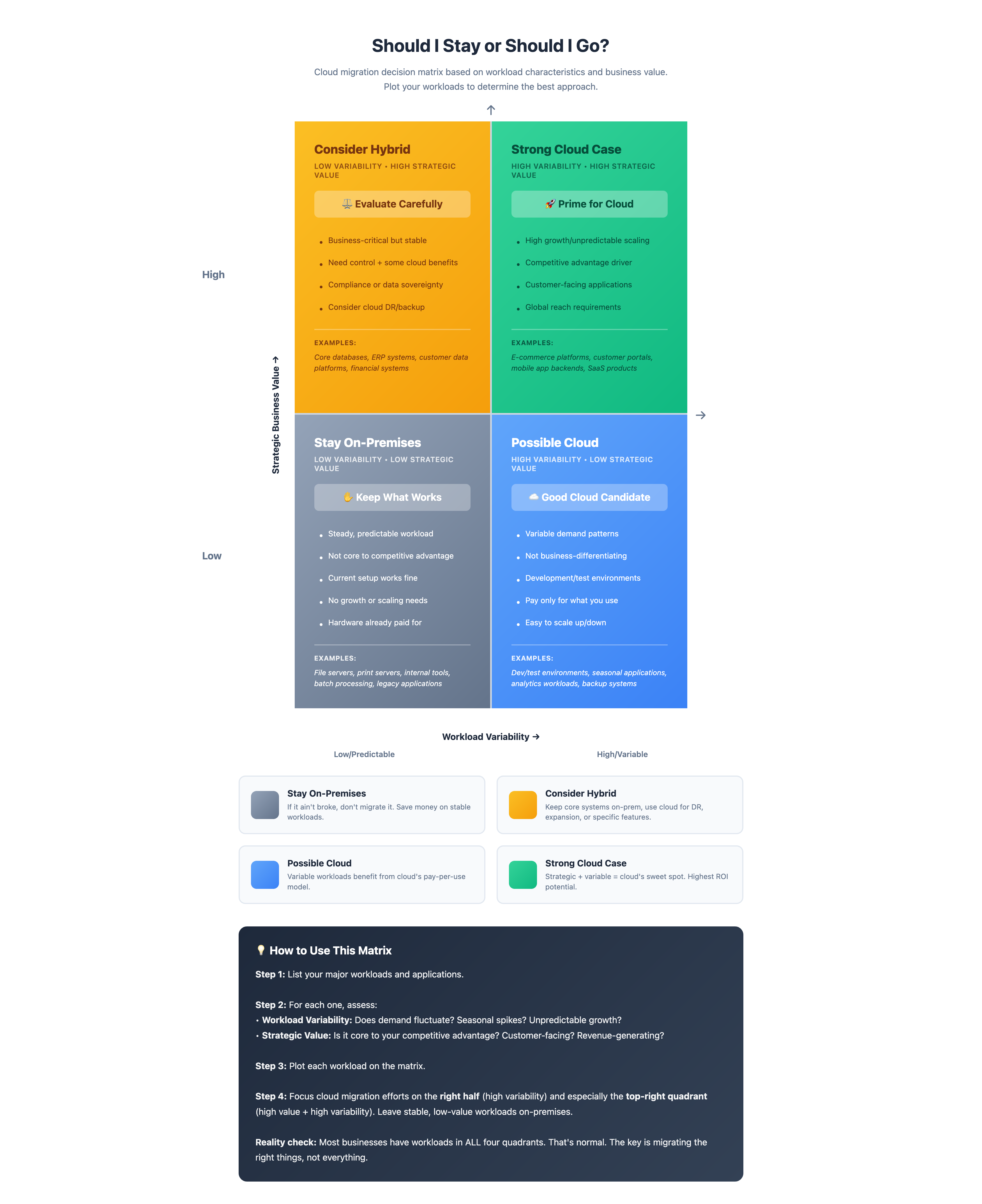
Use this matrix to plot your workloads. Focus cloud migration on the right half (high variability) and especially the top-right quadrant (high strategic value + high variability). Leave stable, low-value workloads on-premises where they’re most cost-effective.
Step 4: Calculate Real Costs
Compare total cost of ownership:
On-premises includes:
- Hardware purchase and refresh
- Software licensing
- Staff time for management
- Power, cooling, space
- Backup and DR infrastructure
- Network connectivity
- Support and maintenance contracts
Cloud includes:
- Compute costs (realistic projections, not sales estimates)
- Storage and bandwidth
- Software licensing (sometimes different in cloud)
- Management tools and monitoring
- Staff time (less, but not zero)
- Training and expertise development
- Migration costs
Run the numbers for 3-5 years, not just year one.
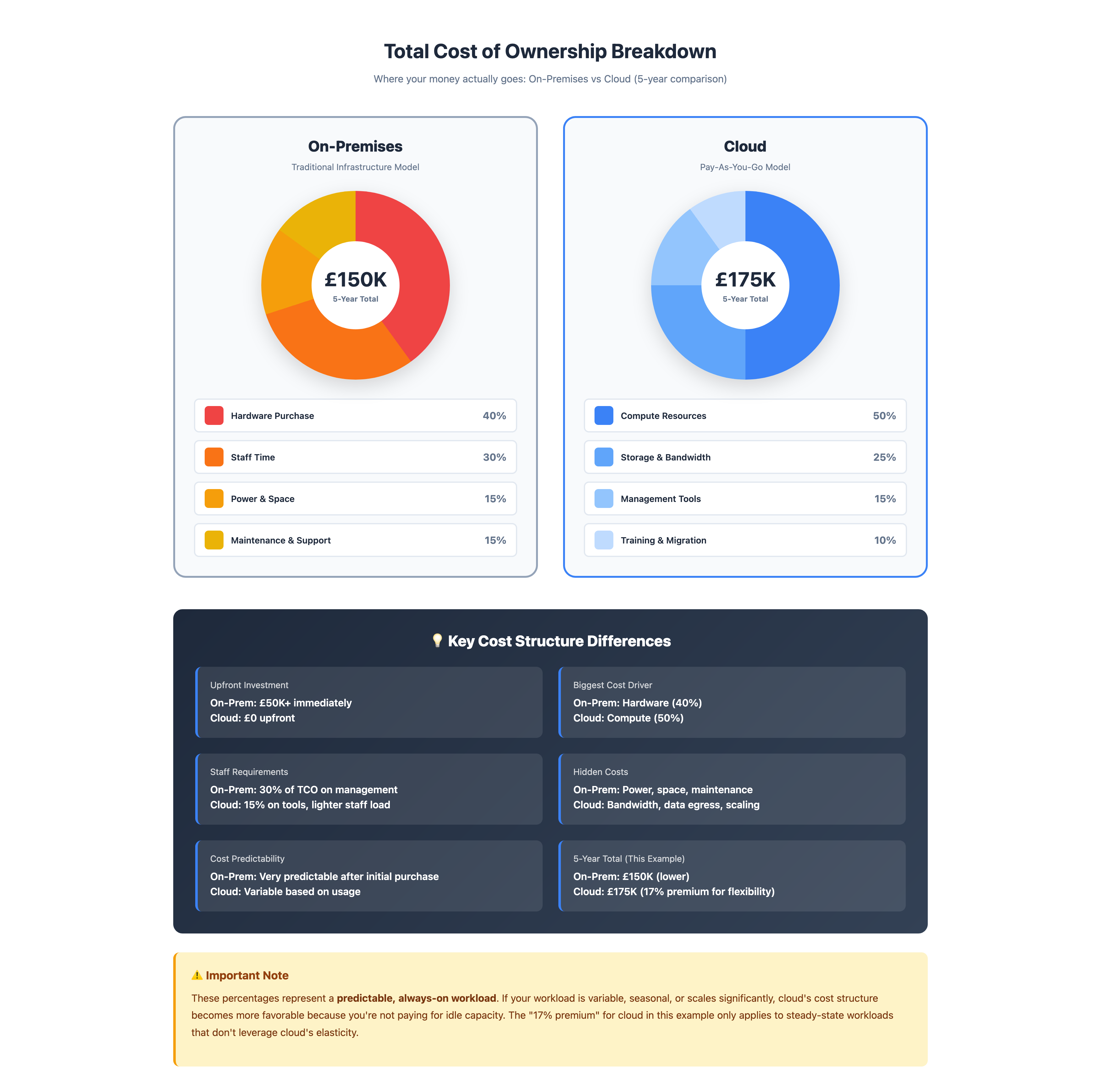
Where your money actually goes: On-Premises hardware and staff dominate upfront costs (40% hardware, 30% staff), while cloud compute resources are the biggest ongoing expense (50%). For predictable workloads running 24/7, on-premises often costs less over 5 years, but cloud eliminates upfront investment and provides flexibility.
Step 5: Assess Risk and Readiness
Technical readiness:
- Do you have skills in-house or need to hire/train?
- Are applications cloud-compatible or need re-architecting?
- What’s the migration complexity and risk?
Organisational readiness:
- Does leadership understand what this involves?
- Can you dedicate resources to migration?
- Are staff willing to learn new approaches?
Risk tolerance:
- How much disruption can you handle?
- What’s your rollback plan?
- Can you afford for this to go wrong?
Step 6: Make the Call
Based on everything above, you should be able to determine:
- Stay on-premises: Current approach works, cloud doesn’t offer meaningful benefits, costs don’t justify change
- Move to cloud: Clear business drivers, costs are justified, benefits outweigh risks
- Hybrid approach: Mixed workload characteristics, staged migration makes sense, want to test before committing
- Wait and see: Not urgent, current infrastructure has life left, will reassess at next refresh cycle
What This Doesn’t Answer
Even if you decide cloud makes sense, you’ve still got questions:
- Which cloud provider? (AWS, Azure, Google, others?)
- What will this actually cost in practice?
- How do we migrate without disruption?
- What about security?
I’ll tackle these in upcoming posts. But you can’t answer them meaningfully until you’ve answered the fundamental question: Should we even be doing this?
The Bottom Line
Cloud computing is a tool, not a religion. It offers genuine benefits for certain use cases and business situations. It also comes with real costs, complexity, and trade-offs.
The right answer depends entirely on your specific circumstances: your workloads, your business model, your team’s capabilities, your growth plans, and your tolerance for change.
Don’t move to the cloud because it’s trendy, sounds like a good idea or someone told you to. Don’t stay on-premises because you always have. Make an informed decision based on your actual needs and realistic assessment of costs and benefits.
And if that decision is “not right now,” that’s perfectly fine. It doesn’t make you a dinosaur or a Luddite. It makes you someone who thinks before spending money.
Download the Cloud Readiness Assessment
Thinking about making the move? This printable assessment scores your readiness across five dimensions — business drivers, technical readiness, team capability, finances, and security — with a clear framework for what to tackle first.
Download the AssessmentNext in this series: “Cloud Economics - the real costs nobody talks about” - cloud economics is not a one and done topic so I’ll take an introductory look at what it’s all about, common gotchas and how you can shield yourself from those surprise cloud bills.